
Spectre Insights
Website redesign: what to preserve before changing the look
A redesign should improve the presentation without casually discarding useful URLs, content, inquiries or the owner’s ability to maintain the site.
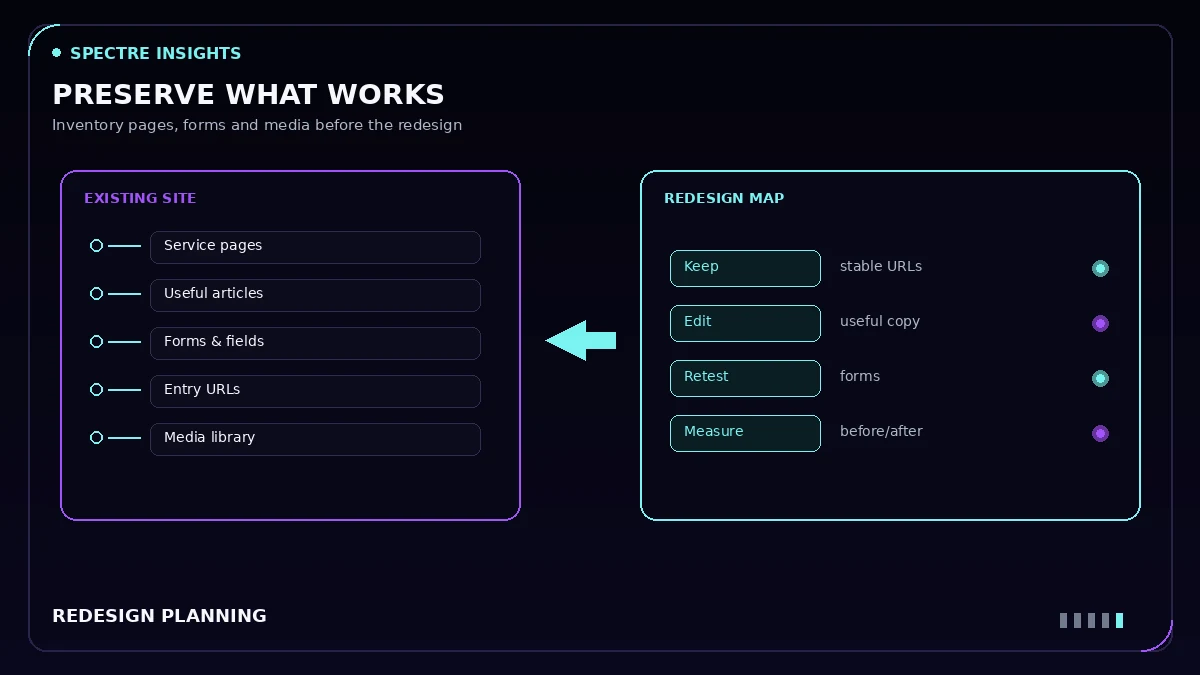
Before redesigning a website, identify what already works: useful content, important URLs, customer paths, search visibility, forms, integrations and access arrangements. Then separate visual changes from changes to content and functionality.
A new appearance can be valuable. It is not a reason to assume that every existing page, link or technical decision should be replaced.
Start with an inventory, not a blank template
Record the current public pages and the purpose of each. Include important articles, service pages, forms, downloadable resources and any pages people reach directly from campaigns or external links.
Not every discovered URL needs to remain public. The point of the inventory is to make that decision deliberately. A page that looks old may still answer a useful question or serve as an important destination.
Identify the content worth keeping
Review the actual explanations, project evidence and customer questions on the current site. A redesign can lose authority when specific information is replaced by polished but generic paragraphs.
Decide which content stays, which needs editing, which can be consolidated and which no longer represents the business. A new layout should make useful information easier to understand—not erase it because it requires more space.
Separate a visual change from a URL move
Changing typography or rearranging cards does not require a new page address. When a URL can remain stable, keep it unless there is a sound reason to move it.
When a page genuinely moves, map the old destination to the most relevant new one. Do not send unrelated pages to the homepage simply to eliminate error reports. Google’s canonical guidance explains the importance of consistent signals for preferred URLs.
Redirect decisions should also be reflected in internal links and the sitemap. A link that still sends visitors through a retired path is different from a direct link to the intended final page.
Treat forms as functioning systems
Save the form configuration before restyling it. Field IDs, validation, notifications, spam protection, thank-you behavior and tracking can depend on more than the visible labels.
A design change should not replace a working form solely because another widget is easier to style. Test relevant scenarios, including errors, optional fields and mobile use. Receiving a browser success response and receiving an email are separate checks.
Preserve measurement context
Inventory the current analytics and advertising configuration. The goal is not to keep every old tag forever; it is to know what each one does before removing or duplicating it.
For example, importing a template that already contains tracking code can introduce a second implementation. Conversely, rebuilding the inquiry path without its existing success condition can stop a previously useful event. Record the intended outcome and verify the post-change behavior.
Compare the actual mobile experience
Keep a before reference at phone width as well as desktop. Review whether the new layout improves heading wraps, navigation, image readability, forms and the order of information.
Do not judge mobile quality solely by the absence of horizontal scrolling. A page can fit the viewport while still making people read tiny diagram labels, dismiss oversized overlays or hunt for the main action.
The W3C reflow explanation offers a useful foundation for assessing narrow-screen access. A complete accessibility review covers more than this one criterion.
Measure performance rather than assuming it improved
A lighter-looking page is not necessarily a lighter page. New fonts, video, animation libraries, large images or repeated widgets can change the loading cost.
Compare equivalent before-and-after tests using the same settings and record their limitations. A laboratory score is a diagnostic snapshot. It is not proof that every real visitor experiences the same speed or that a redesign increased sales.
Keep a recoverable starting point
Before replacing content or templates, create the backups or exports needed to recover the affected work. Record what they contain and how restoration would be performed. An exported page template is not a full database-and-files backup.
The production handoff should also identify what changed, what was tested, what remains uncertain and how the owner can make routine edits.
Illustrative example: a redesign inventory worksheet
| Current page | Purpose | Decision | Redirect needed? | Form or tracking on page |
|---|---|---|---|---|
| /services/carpet-cleaning/ | Main service page; receives inquiries | Keep URL; refresh layout | No | Quote form (keep success event) |
| /carpet-cleaning-tips/ | Older article with useful answers | Merge into the service FAQ | Yes, to the service page | None |
| /spring-special/ | Expired offer | Retire | Yes, to the closest current page | Old promo form (remove) |
The paths above are invented for illustration. Use your own page list and record each decision before design work begins.
Redesign review checklist
- Important pages and existing entry paths are inventoried.
- Useful content and authentic proof are preserved.
- URL changes have exact relevant mappings.
- Forms and measurement have documented baselines.
- Mobile and desktop comparisons are reviewed.
- Performance is measured under comparable conditions.
- The owner receives editing and recovery information.
Decide whether a redesign is the right scope
Sometimes the best next step is a focused content, form or mobile improvement rather than a full rebuild. The recommendation should follow the findings and the business need.
Explore Spectre Stacks’ website design and development service or discuss an existing-site project. Advertising management is optional, not a condition of the work.